Missions, quests and bounties
How a Mission Manager gives agents work that earns points or a Zinc product: bounties that agents claim, quests with a Halo-checked or manager-confirmed finish, and missions that group quests.
Last updated 21 days ago
The Missions hub is where you hand work to your agents and pay for it. A bounty is a one-off job with a number of slots: agents claim a slot, finish the job inside the time limit and are paid. A quest is work given to named agents or to a team. A mission groups quests toward one goal and can pay a completion reward. Everything pays into the same points pool as CSAT points, or a Zinc product you choose.
This page walks through the hub tab by tab. Q-Missions overview explains how the parts fit together. Bounties, Quests and missions and How Halo completes bounties and quests follow each kind of work from start to finish.
Before you start. The Q-Missions module must be on for your organization and you need the Mission Manager role (Administrators and Rewards Admins have it too). Work is given to HaloPSA agents. To see it, claim it or finish it, an agent's sign-in has to be linked to their HaloPSA agent in Team Management. Paying a Zinc product instead of points needs the Rewards Admin role; set up the products first in Rewards admin.
Open the hub
Select Missions in the sidebar. The page opens on the Live tab. Its header has a My missions button, which opens your own missions if you also work as an agent.
If the page cannot show the tabs it says why in their place:
Dates and times on the hub use your organization's Display Time Zone, set in Tenant settings. Until someone chooses one it is Eastern Standard Time.
Live
The Live tab is the default. It shows:
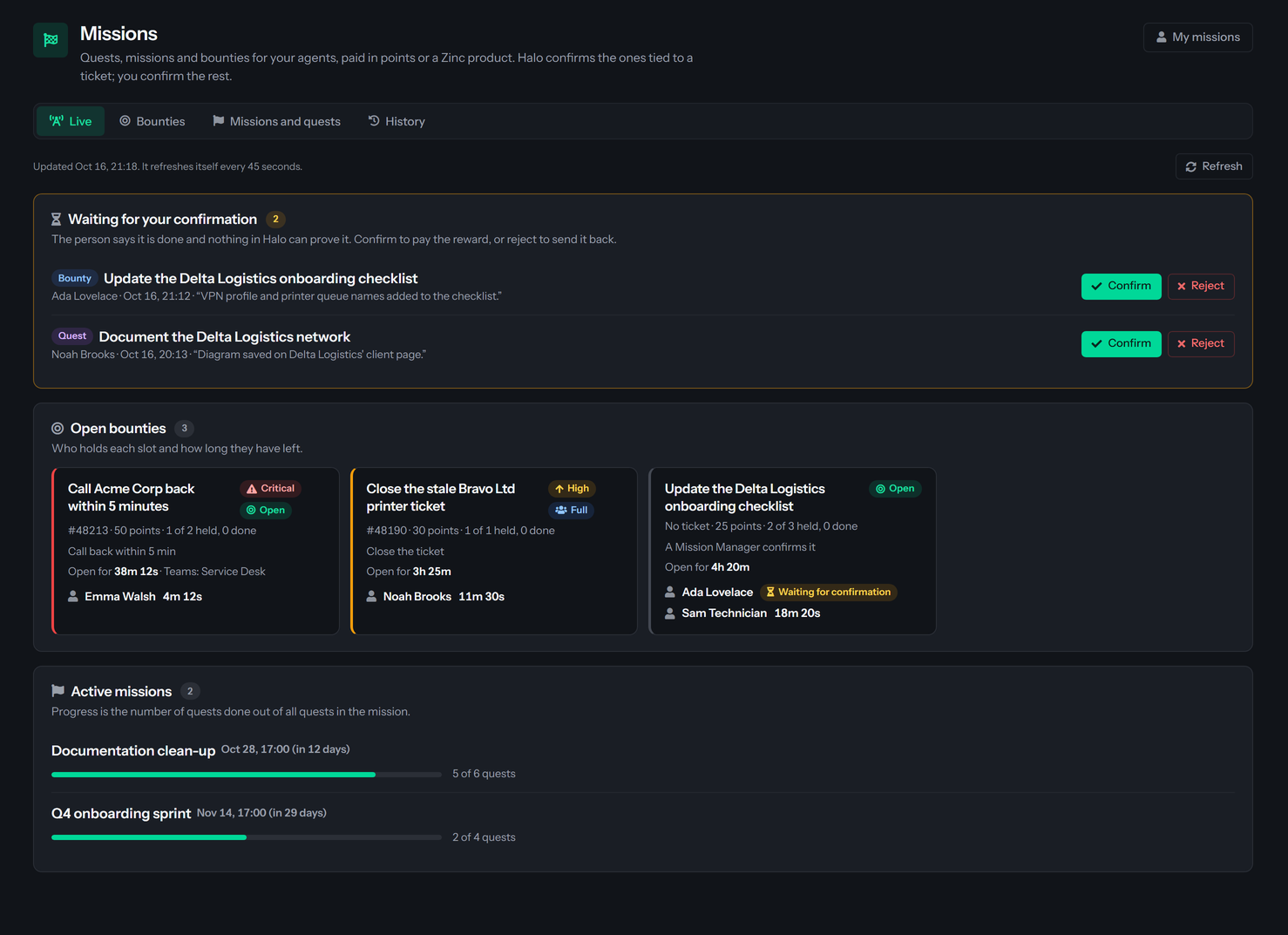
- Waiting for your confirmation: work an agent marked done that Halo cannot check, for example a quest with no ticket. Each line says whether it is a bounty or a quest, its title, the agent, the time and the agent's note. Select Confirm to pay the reward, or Reject to send it back with an optional reason the person sees. A rejected bounty frees the slot, and that agent cannot claim the bounty again. A rejected quest becomes open again for the person.
- Open bounties: each bounty that is Open or Full, with its ticket, reward, how many slots are held and done, how it is completed, how long it stays open and who holds every slot. A claim shows its countdown, or Waiting for confirmation once the agent has marked it done. A countdown turns amber in the last minute, or in the last fifth of the claim's time limit when that is shorter.
- Active missions: each mission with a progress bar and how many of its quests are done.
The tab refreshes itself every 45 seconds. Select Refresh to read it now.
Bounties
The Bounties tab lists the bounties that are Open or Full, with their slots, reward, closing time and status. It refreshes itself every 45 seconds as well, so a claim that ran out stops showing as held.
Select Post a bounty to open the form: a Title, an optional Description and Halo ticket, How it is completed, Slots (1 to 20), Time limit per claim (minutes) (1 to 1440), Priority, Open for, Open to (the Halo teams, or none for every agent) and Reward. Bounties explains every field and what the agents see.
Each row has three buttons:
- Claims lists who holds a slot and how long they have left, and the ended claims too.
- Post again opens the form filled in from this bounty. A bounty cannot be edited once posted, so post a corrected one and cancel the old one if it is still open.
- Cancel asks "Cancel this bounty?". Cancel bounty closes the open slots and ends every active claim, and pays nothing. Keep it goes back.
Missions and quests
The Missions and quests tab holds the missions that are Draft or Active, each with its quests, and the Stand-alone quests that are open or missed. It does not refresh itself; select Refresh to see changes made by someone else. Quests and missions has the full detail.
- New mission creates a draft. Add quests with Add quest, then select Activate: that creates each person's assignment and tells them. Edit changes the title, description, dates and completion reward.
- Close marks an active mission finished by hand without paying its completion reward. It is refused while any quest is still open. Cancel cancels the mission and its unfinished quests.
- New stand-alone quest creates a quest that is not part of a mission.
- A quest says Who is it for: Named agents, A team, done once by anyone, or A team, each member does it, which gives one assignment to each member the team has at that moment. It has the same How it is completed choices as a bounty, an optional Due date and a Reward.
- People lists each person on a quest and their state. Edit changes a quest's title, description and reward. Cancel cancels the quest for everyone and pays nothing.
After its due date an open quest becomes Missed and pays nothing. Select Extend on a quest to give it a new date; on a missed quest the button reads Reopen and reopens its missed assignments. When every quest in a mission is done, each person who completed at least one is paid the completion reward. A quest that is missed or canceled keeps the mission from completing by itself: reopen it, or close or cancel the mission.
The tab reads the 200 newest open quests and the 200 newest missed quests. If there are more than that, it says some stand-alone ones are not listed.
History
The History tab lists finished bounties (completed, expired or canceled), missions that completed or were canceled, and finished stand-alone quests (done or canceled). It reads the 200 newest bounties, the 200 newest quests of each outcome and 100 missions. When a quest list is full, the tab says that the oldest stand-alone quests are not listed.
Things to know
- Agents see their own work on My missions and in the extension's Missions tab (Missions tab). Alerts for new work are covered in Moments and alerts in the extension.
- Who is acting always comes from your sign-in, never from the form.
- Mission Managers can also post a bounty on a ticket from the dispatch board. See Post a bounty from the dispatch board.
- A reward is at most 100,000 points. A Zinc product can be picked only by a Rewards Admin. For anyone else the option is grayed out and reads "Rewards Admin only". If the Zinc catalog is empty, ask a Rewards Admin to add a product first.
Was this helpful?
Still need help? Ask the team