Review Recurring Invoices (Beta)
A beta tool, used right after importing the month's charges, that finds the HaloPSA recurring invoices that would keep billing old lines this month and lets you clean them one client at a time, with a backup and an Undo.
Last updated 24 days ago
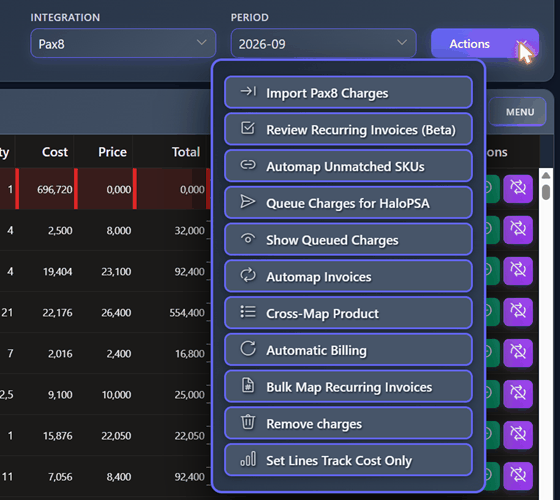
Review Recurring Invoices is a dialog opened from the Actions menu of Ready to Invoice, right below the option that imports the month's charges. It finds the HaloPSA recurring invoices that would keep billing old lines this month — products a client no longer has — and lets you clean them, one client at a time, after you have seen exactly what will change.
Beta. This feature is still being implemented. Review the data carefully before cleaning an invoice. Every clean takes a full backup of the invoice first, so it can be undone with Undo in the dialog or with Restore Backup in Invoice History.
Why this is needed
In HaloPSA a recurring invoice is a template: every billing cycle, HaloPSA creates the real invoice by copying the lines the template has at that moment. Whatever is left on the template gets billed again, month after month.
Each month, when you send a client's charges, BillingBot updates that template: it removes the lines it wrote for the client in previous months and writes the new ones. But some lines escape that refresh and keep billing a product the client no longer has. It happens in two situations:
1. The client receives no charges this month on that invoice. Nothing is sent to the invoice, so nothing is refreshed and every line of last month stays. Typical causes:
- the client cancelled everything, or none of its charges came in this month's import or CSV;
- the client is marked Do Not Invoice (pencil icon in Client Management);
- the client's charges now go to a different invoice than last month — for example after Change Target Invoice sent them to another recurring invoice for one month, or after the client record's recurring invoice was changed. A send only removes the client's earlier lines from the invoice it writes to, so the lines left on the other invoice keep billing every month. This tool is the way to remove them (after such a send, BillingBot also warns you with "Check these recurring invoices: ...").
2. A line created in HaloPSA that BillingBot only updated. When a product already had a line on the HaloPSA invoice (created by you or your team, with the same Accounts ID), BillingBot does not add its own line: it updates the existing one, changing its quantity and price. BillingBot never removes those lines on its own, because they are yours. So when the product stops arriving — even if the client still has other charges — the line keeps billing its last quantity.
Until now these lines had to be found and fixed by hand in HaloPSA. This tool finds them and fixes them for you, always after you confirm.
When to use it
Right after importing the month's charges (for example after Import Pax8 Charges or loading a CSV), and before HaloPSA generates the invoices of the cycle. The review compares what you just imported with what was sent last month, so this month's charges need to be in.
The review works per source: with the Pax8 integration selected it only looks at Pax8 charges; with a CSV integration, only at that CSV. Each source only cleans its own lines.
Nothing runs automatically: the tool only reads until you click Clean this invoice and confirm.
The lines it can find
When the tool reads an invoice from HaloPSA, it sorts the client's lines into these groups:
How BillingBot knows a HaloPSA line was updated by it. Since October 2026 every send records which HaloPSA line each charge updated, so the tool knows it exactly. For older sends it uses the summary saved with each send's backup, and if there is none it deduces the line from its Accounts ID. Deduced lines are marked probable: check them in HaloPSA before changing them.
When a product counts as "still arriving". A HaloPSA line is not reported when this month brings a charge for the same Accounts ID or the same product for the same invoice: the send will update the line again. Charges of a client marked Do Not Invoice, or charges going to another invoice, do not count. Lines already at quantity 0 are not reported either.
What the dialog shows
The dialog compares the selected Period with the month before it. Depending on the result you see one of these:
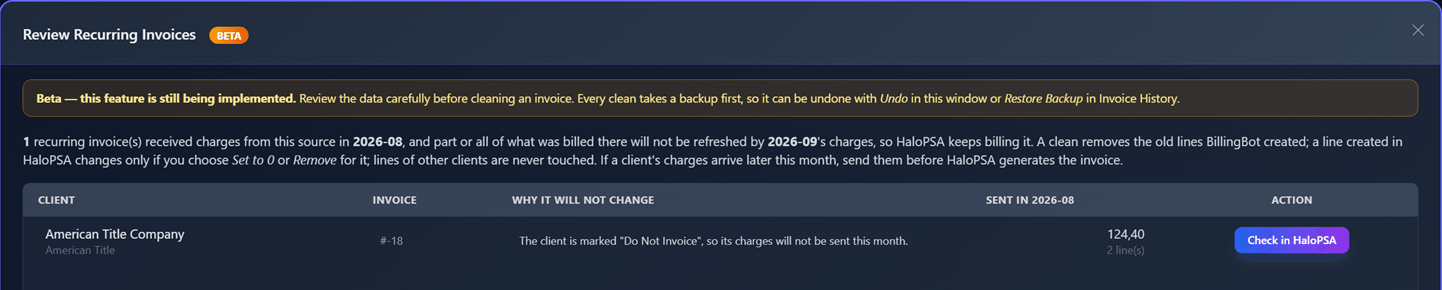
The table has one row per client and recurring invoice:
Possible reasons:
Checking an invoice
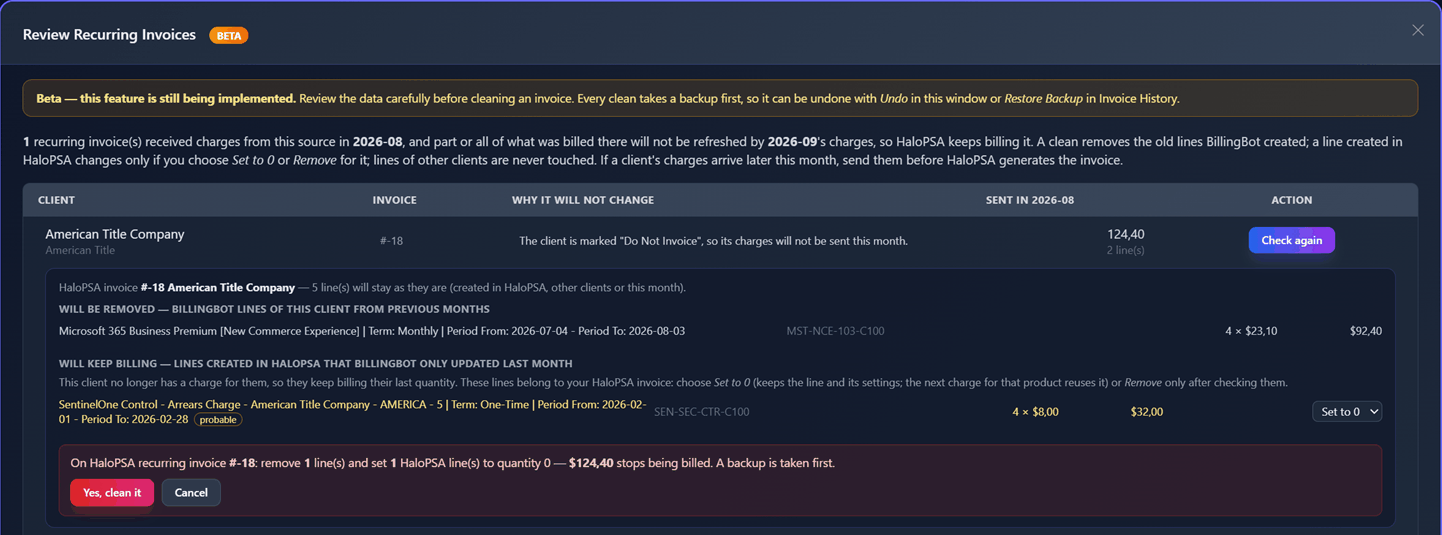
Click Check in HaloPSA on a row. BillingBot reads the invoice from HaloPSA and shows, under the row, exactly what a clean would do. Nothing is changed in HaloPSA or in BillingBot.
The detail shows the invoice number and name, how many lines stay as they are, and then the groups described above. Each line shows its description, Accounts ID, quantity × price and total.
For each line under "Will keep billing" there is a selector:
- Keep (default): nothing changes; the line keeps billing.
- Set to 0: the line stays on the invoice with its description, price and settings, at quantity 0, so it bills nothing. If the product comes back, the next send matches the line again and sets the right quantity. This is the recommended option.
- Remove: the line is taken off the invoice.
A line marked probable has a tooltip explaining why. Check it in HaloPSA before choosing Set to 0 or Remove.
Check again reads the invoice again, for example after you changed it in HaloPSA.
Cleaning an invoice
- When there is something to clean, the button Clean this invoice (N line(s)) appears. N counts the BillingBot lines to remove, the orphans you ticked and the HaloPSA lines you set to 0 or removed.
- Click it. A confirmation shows what will be removed, what will be set to 0 and the total that stops being billed.
- Click Yes, clean it (or Cancel to go back without changes).
What happens when you confirm:
- BillingBot reads the invoice again and checks that it is still exactly as you saw it. If someone sent or edited it in between, nothing is written and you are asked to check it again.
- It saves a full backup of the invoice.
- It writes the invoice to HaloPSA with the chosen lines removed or set to 0. HaloPSA lines you did not choose are sent back exactly as they were, and kept active.
- No charge in BillingBot changes its status.
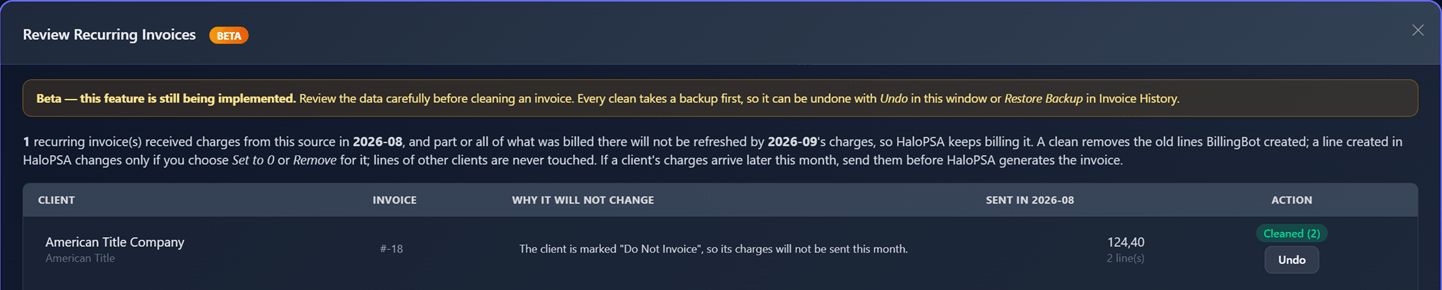
A message confirms how many lines were cleaned, and the row shows Cleaned (N) with an Undo button. HaloPSA lines you kept are listed under "Still billing after the clean".
Only one client is cleaned at a time, and a clean cannot run while a send to HaloPSA is in progress for your account.
Example
A client had two products billed last month on its recurring invoice: Microsoft 365 (4 × 23.10 = 92.40), on a line BillingBot created, and SentinelOne (4 × 8.00 = 32.00), on a line created in HaloPSA that BillingBot only updated. This month the client is marked Do Not Invoice.
- The review lists the client with "The client is marked "Do Not Invoice"..." and 124.40 sent last month.
- Check in HaloPSA shows Microsoft 365 under Will be removed and SentinelOne under Will keep billing (marked probable because last month's send was older than October 2026).
- Choosing Set to 0 for SentinelOne and cleaning removes the Microsoft 365 line and leaves SentinelOne at quantity 0: the invoice total drops by 124.40, and every other line stays the same.
- Undo puts the invoice back exactly as it was.
Undoing a clean
Every clean saves a full copy of the invoice before changing it. There are two ways to undo it:
- From this dialog: click Undo on the cleaned row while the dialog is still open. The row then shows Restored, and you can check it again. Undo is the same restore as Restore Backup: it is recorded (who and when), the clean's backup is removed afterwards, and it is refused if the invoice was sent after the clean (undoing the clean would also erase that send from HaloPSA while BillingBot keeps it as sent).
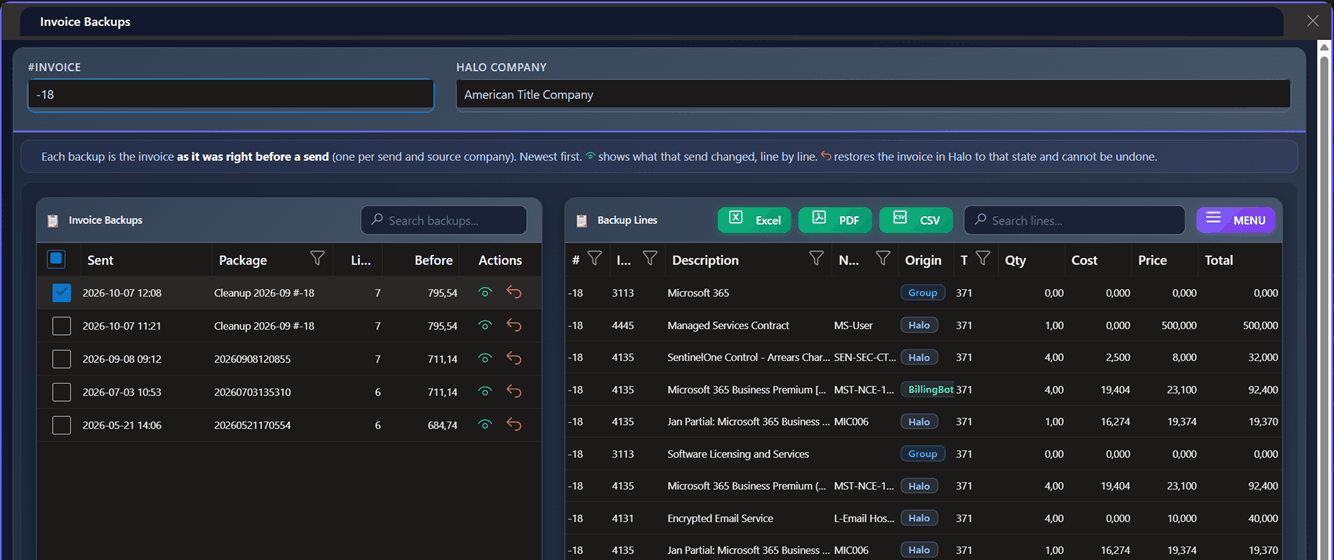
- From Invoice History: select the previous month in Period (the last month this client was invoiced; in the current month the client has no sent charges, so it does not appear). Open the client's invoice backups: the clean appears at the top as "Cleanup <month> #<invoice>", with the time it was taken in Sent. Use Restore Backup on it.
What it never does
- It never cleans anything without your confirmation, and never runs on its own.
- It never changes a line created in HaloPSA unless you chose Set to 0 or Remove for it.
- It never touches the lines of other clients on a shared invoice.
- It never changes the status of any charge in BillingBot.
Step-by-step flow
- In Ready to Invoice, select the Integration and the Period, and import the month's charges.
- Open Actions → Review Recurring Invoices (Beta).
- Read the result. If the table appears, go through it client by client.
- Click Check in HaloPSA on a row and review what would change. If something looks wrong, stop and check the invoice in HaloPSA.
- Tick only the orphan lines you have confirmed in HaloPSA are not needed.
- For each line under "Will keep billing", choose Set to 0 or Remove if the client no longer has that product, or leave Keep.
- Click Clean this invoice, review the confirmation and click Yes, clean it.
- Check the invoice in HaloPSA. If something is not right, click Undo.
- If this client's charges arrive later in the month, queue and send them before HaloPSA generates the invoice; otherwise the client would not be billed for this month.
Common errors and how to resolve them
- "No Period selected": choose the month in the Period dropdown of Ready to Invoice before opening the review.
- "The invoice changed in HaloPSA since you checked it (someone sent or edited it). Nothing was changed. Check it again before cleaning.": the invoice is no longer the same as when you checked it. Nothing was written. Click Check again, review the new detail and clean again if it is still needed.
- "There is nothing to clean on this invoice any more. Check it again.": the old lines were already removed or changed (by a send or by hand in HaloPSA). Click Check again to confirm.
- "A HaloPSA line you chose is no longer one BillingBot updated for this client, or the action is not valid...": the line changed since the check. Nothing was written. Click Check again.
- "A send to HaloPSA is already running for this account...": a send (or another clean) is in progress. Wait for it to finish and try again.
- "HaloPSA rejected the change (...). Nothing was removed.": HaloPSA did not accept the update; the invoice stays as it was. Try again later; if it persists, report it to support with the message.
- "The backup of this clean was not found. Use Restore Backup in Invoice History instead.": the Undo could not find the backup; restore it from Invoice History as described above.
- "This backup cannot be restored: invoice #… received a later send (package …)..." (when clicking Undo): the invoice was sent after the clean, so the clean can no longer be undone without erasing that send. Check the invoice in HaloPSA and fix any line by hand, or restore the send's backup in Invoice History if that is what you need.
- "Failed to retrieve GetHaloRecurringInvoiceAsync ...: Not Found", "Recurring invoice ... returned an empty or unreadable response from Halo..." or "HaloPSA returned no data for this recurring invoice.": the recurring invoice no longer exists in HaloPSA or could not be read. Check the invoice in HaloPSA and the client's invoice assignment.
- "The Halo URL is not configured for this tenant...": set the HaloPSA URL in Settings before using this tool.
Frequently asked questions
Why does "Sent in <previous month>" show more than the clean removes? It counts everything sent last month, including HaloPSA lines that BillingBot only updated. Those are listed apart, under Will keep billing, and only change if you choose so.
Should I use Set to 0 or Remove? Set to 0 keeps the line with its settings and lets the next charge for that product reuse it, so it is the safe choice. Use Remove when the client will not have the product again and you do not want the line on the invoice.
The client's charges arrived after I cleaned. What now? Queue and send them as usual: the send writes the new lines (and updates a HaloPSA line set to 0 if the product matches). Send them before HaloPSA generates the invoice.
The invoice is shared by several clients. Is it safe? Yes. A clean only touches the lines of the client you are cleaning; the other clients' lines are sent back unchanged.
Related screens
Was this helpful?
Still need help? Ask the team